
|
Reporting: Overview
Navigation from your Home screen:
 or
or  >
> 
Your employee role must have the Reports permission to access reports. See "Roles & Permissions" for more information.
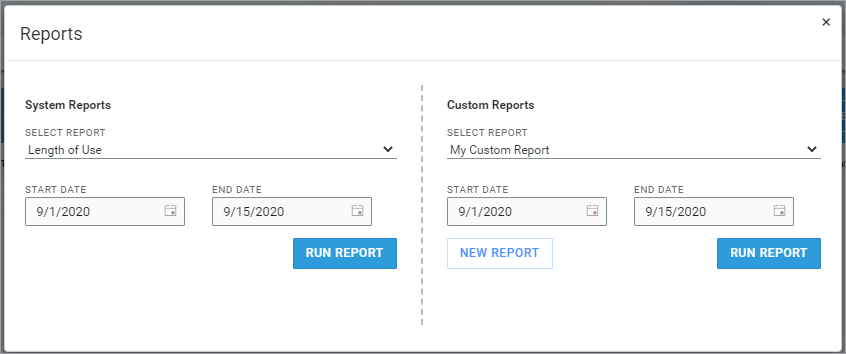
HMA SRC offers two approaches to reporting.
- System reports. Choose from a selection of predefined reports to help you monitor various aspects of business activity for your current location.
- Customized reports. Build your own report from scratch, choosing from a comprehensive selection of criteria to make it your own.
Available System Reports
The following predefined, system reports are available on the Reports dialog for your current location, depending on your employee role permissions:
In addition to reports, HMA SRC's centralized Operations and Performance dashboards offer live data for your current location, including helpful agreement and fleet metrics, allowing you to pick and choose what information matters to your business.
- Appointment Summary Report. Appointments scheduled to be picked up at your location in a certain date range.
- Closed Contract Accounting Report. A summary and detailed breakdown of how much revenue in rates, charges, fees, and taxes your location is generating from closed agreements.
- Credit Card Transactions Report. Credit card transaction details from a given time period.
- Dealer Credit Card Reconciliation Report. For locations with TSD Charging (credit card and payment processing) and toll processing, view dealer payments for toll violation charges.
- Delivery and Collection Report. For locations with TSD's Delivery and Collection integration, view key Delivery and Collection information about your agreements.
- Do Not Loan Report. Customer records that have been flagged as Do Not Loan. Available for employees roles with permission.
- Full Inventory Report. All active units currently at your location.
- Length of Use (LOU) Report. LOU information, broken down by service advisor.
- Service Advisor Report. Key agreement information for locations using Reynolds Integration, including Time to Close (after invoiced RO), broken down by service advisor.
- Test Drive Report. Key information for your Test Drive agreements opened within a certain period.
- Turn Rate Report. The average monthly Turn Rate for each active unit in your fleet, as well as your total fleet's average monthly Turn Rate.
- Uber Ride Report. Key information about Uber Ride agreements.
- . The number of miles driven on each agreement, grouped by unit.
- Utilization Report. The percentage of time each unit in your location's fleet has been in use.
Custom Reports
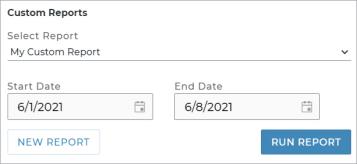
Build your own custom reports from scratch, without using a predefined available report as a template. If you've already built and saved a custom report, select the report from the Custom Reports list on the Reports dialog. Or, click to start building a new report with HMA SRC's Report Builder, where you can choose criteria, columns, and viewership. See "Report Builder for Custom Reports" for more information.
Frequently Asked Questions
 How do I run a pre-defined system report or a custom report?
This is a quick reference walkthrough. See "Reporting: Overview" for full, detailed instructions.
- On the Reports dialog, select an available system or custom report. (Click in the Custom Reports section to start building your own custom report. See "Report Builder for Custom Reports" for more information.
- If necessary, edit the reporting Start Date and End Date.
- Click .
Many of our reports are customizable for your viewing preferences. See "Reporting: Overview" for a full list of reports, customization and sorting options, and column descriptions.
How do I build my own report from scratch?
In the Custom Reports section of the Reports dialog, click to access HMA SRC's Report Builder. See "Report Builder for Custom Reports" for more information.
Why can't I edit or delete a custom report in the Report Builder?
If the custom report was created by another employee, you can only update or delete the report if your employee role has the Edit Custom Report permission and the report's access is set to Anyone, granting all employees viewership to the report.
What reports should I run on a daily, weekly, or monthly basis?
Open and print a Personal Reporting Template to create a reporting schedule based on your employee role and location's needs. Fill in the blanks with reports that you plan to use daily, weekly, or monthly.
Can I export a report?
Run the report, and click , , or (depending on the report).
How can I customize my report results?
You can adjust sorting and customize your report options for optimal viewing. Depending on the report, you can:
- Choose and reorder report columns.
- Sort results by a column.
- Filter results.
How do I understand reporting results?
A description of key reporting columns is available in the Help topic for the report. See "Available System Reports" for a list of available reports and their Help topics.
Can I edit an existing system report?
You may want to run a version of an available system report that includes additional columns or statuses or other criteria typically available with custom reports. Depending on your employee role permissions, you can save a custom version of the system report under a new name, then modify the custom report to your heart's content in the Report Builder. Currently, you can do this with the Full Inventory and Utilization reports.
© 2026 TSD Rental, LLC